

What Are Google Search Console Platform Properties? (2026 Guide)
Google Search Console now covers Instagram, TikTok, X & YouTube. See the exact search queries sending people to your posts — free, 10-minute setup.
Google Search Console Just Rewrote
the Concept of “Property”
For 20 years, a Search Console property meant a website you owned. Now you can link Instagram, TikTok, X, and YouTube, and finally see which searches send people to your social content.
What does Dave think?
Search Console properties are no longer limited to websites.
On July 7, 2026, Google announced platform properties, a brand-new property type. Since Search Console launched (as Webmaster Tools) two decades ago, a “property” has always meant a website: a domain or URL prefix you could prove you owned with a DNS record.
That limit is gone. You can now add your Instagram, TikTok, X, and YouTube profiles as properties, even though you don’t own those domains. As SEO veteran Barry Schwartz put it, this is the first time Google has given anyone real Search performance data for content on domains they don’t control.
Plain-English version: This does not replace your website property. It gives you a separate Search Console view for supported platform accounts.
* Please keep in mind that this is still rolling out, so it may not yet be available in your GSC “today.” Be sure to check again next week.
Why You Should Care
Most creators treat search traffic to their social profiles like a black box. You see clicks arrive, but you have no idea what people searched for to find you. Platform properties open that box:
See the Search Terms
Track the exact queries leading people to your social and video posts on Google Search. Know why people are finding you, not just that they did.
Cut the Noise
Find out which platforms actually support your search strategy, and stop wasting effort on the ones that don’t.
Bridge the Gap
The wall between “website SEO” and “social reach” just came down. One report now connects them.
A Practical Content Decision
Imagine a small website security company publishes four pieces of content: a YouTube video about hacked WordPress sites, an Instagram post about password safety, a TikTok clip about fake plugin updates, and an X post about Search Console warnings.
The Messy Reality Nobody Tells You About
Here’s what usually happens: you check your Instagram analytics, see thousands of impressions but only a handful of clicks. You assume the content failed. But Platform Properties reveals the truth: your Instagram post is ranking #2 on Google for “WordPress password safety,” yet the image caption is truncated in the search preview, killing your click-through rate.
Meanwhile, your TikTok clip you almost didn’t post? It’s suddenly pulling high-intent traffic for “fake WordPress plugin update.” Without Platform Properties, you’d never know Google was surfacing it. With it, you know exactly how to adjust your titles and descriptions to capture that search intent, and exactly which social posts to double down on.
Gets impressions for “WordPress malware cleanup.” Turn that topic into a full blog article.
Gets clicks for “fake WordPress plugin update.” Make a follow-up clip with a clearer checklist.
High impressions, low clicks. Fix the caption for search previews, or use Instagram for community instead.
Appears mostly for branded searches. Treat it as brand support, not the main search channel.
TVCNet-style takeaway: Connect the accounts, read the queries, and let the data tell you where to spend your next hour.
How to Add a Platform Property
Setup takes about 10 minutes per platform. No website, developer access, or DNS records required.
-
1
Open the Property Selector
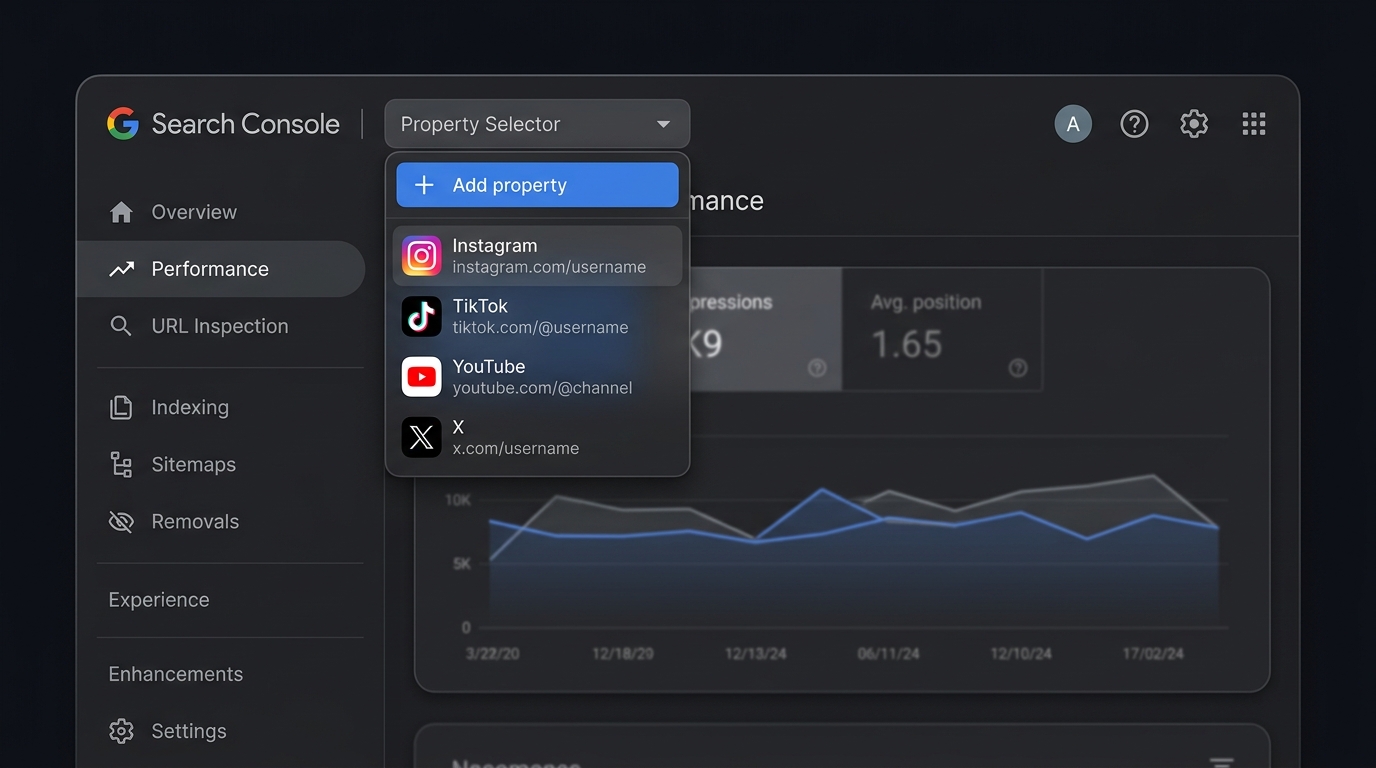
Sign in to Google Search Console. Open the property drop-down in the top-left corner and click Add property.
- Use the same Google account that should manage the property
- If this is your first property, you’ll land on the welcome screen
-
2
Pick a Platform, Not a URL
Where you’d normally enter a domain, you’ll now see four supported platforms: Instagram, TikTok, X, and YouTube. Pick the one you want to connect.
- Each profile becomes its own separate property
- If you run three accounts, repeat this three times
📱Platform Picker
Four new options sit alongside Domain and URL prefix.
📷 🎵 ✖️ ▶️ -
3
Authorize the Connection
Follow the on-screen steps: sign in to the platform, approve the connection, done. Google confirms you control the account and links it to Search Console. No code snippets, no DNS records.
🔐Secure Verification
A quick sign-in replaces DNS records and HTML files.
-
4
Read the Performance Report
Give it a few days for data to collect. Once it does, you get three reports:
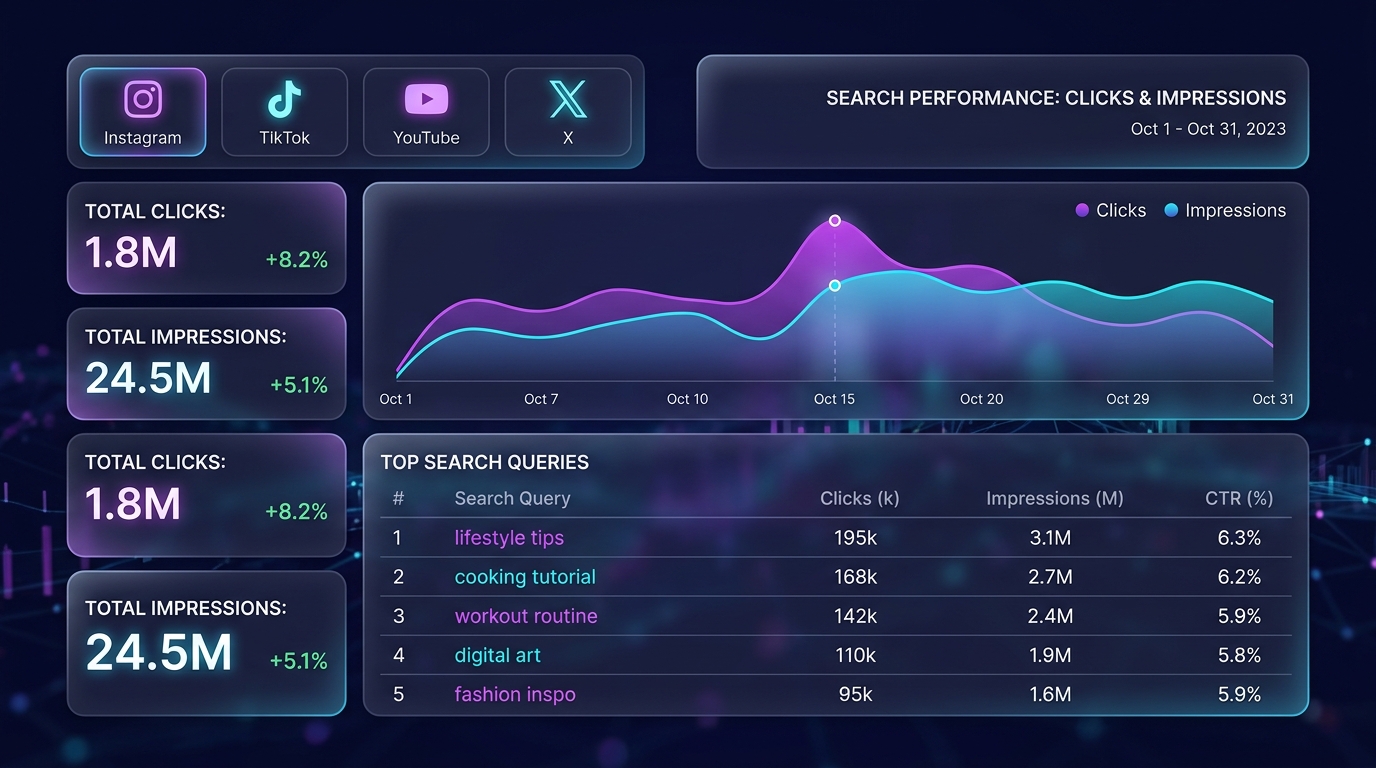
- Performance: clicks, impressions, CTR, position, and the exact search queries. Fully exportable.
- Insights: high-level traffic trends and discovery methods
- Achievements: milestone tracking for Search traffic over 28-day periods


Rollout note: Google says Platform Properties are becoming available gradually. If you do not see the option yet, check again later. No action is required on your part.
What Data Can You See?
Once a platform account is connected, Search Console reports the same core metrics you already know from website SEO, applied to your social content.
- Clicks from Google Search to your social posts
- Impressions in Search results, Discover, and Google News
- Average click-through rate (CTR)
- Average position in search results
- The exact queries people used to find your content
- Specific posts or videos driving the most traffic
- Insights and achievements for growth milestones
What It Does Not Track
This boundary is the difference between a useful report and a misleading one.
What You Get Per Platform
Each social platform surfaces slightly different data. Select a platform below to see what to expect.
Instagram Platform Property
Track how your Instagram profile and individual posts appear in Google Search results and Discover feeds. See which search queries surface your Reels, Stories highlights, and photo posts.
- Profile-level click and impression data from Google Search
- Top queries driving traffic to your Instagram content
- Reels vs. static post performance breakdown
- Discover feed visibility metrics
- Verification via Meta Business Suite
Reels · Stories · Posts · Profile
TikTok Platform Property
Discover which of your TikTok videos rank in Google Search and what keywords people type to find them. Particularly powerful for tutorial and educational content.
- Video-level search performance data
- Query-to-video mapping for content optimization
- Google Discover presence tracking
- Trend alignment with search intent data
- Verification via TikTok for Business OAuth
TikTok
Short-Form Video · Tutorials · Trends
YouTube Platform Property
YouTube already had some integration with Search Console, but Platform Properties upgrades this significantly with dedicated reports, Shorts tracking, and query-level insights.
- Enhanced query data beyond YouTube Studio analytics
- Shorts vs. long-form search performance comparison
- Google Discover and Google News visibility
- Channel-level impression and click trends
- Automatic verification via linked Google account
YouTube
Videos · Shorts · Channels · Playlists
X (Twitter) Platform Property
See how your tweets and profile rank in Google Search. X posts frequently appear in Google’s “Discussions and forums” and real-time results. Now you can measure that impact.
- Tweet and thread visibility in Google Search
- Profile search impressions and click data
- Query insights for tweets appearing in Discussions carousels
- Real-time content indexing metrics
- Verification via X developer portal OAuth
X (Twitter)
Tweets · Threads · Profile · Discussions
A Simple Review Workflow
You don’t need a massive analytics process. Start small. The goal is to learn which platform content is already helping people find you through Google.
Connect each supported platform account and confirm the right profile or channel is attached.
Let reports populate. Early data can be thin, so avoid big decisions too quickly.
Review top posts, queries, impressions, and low-CTR opportunities.
Check the queries. If a post ranks, do more of it: same topic, same format. If it doesn’t, stop spinning your wheels. Cut formats Search ignores, or retitle content using the queries that do rank.
Pro tip: Export the queries table monthly. Over a quarter, you’ll build a keyword map of what Google thinks your social presence is about, often very different from what you think it’s about.
Common Questions
Does a platform property replace my Instagram or YouTube analytics?
No. Platform properties only show how your content performs on Google Search: clicks and impressions from search results. On-platform views, likes, and engagement still live in each platform’s own analytics.
Why can’t I see platform properties in my account yet?
Google is rolling the feature out gradually over several weeks from July 7, 2026. There’s nothing to enable. The option appears in the Add property menu when your account gets it.
Which platforms are supported?
Instagram, TikTok, X (formerly Twitter), and YouTube at launch. Each connected profile is its own separate property.
Is this the same as Google’s “Search profiles”?
No. A Search profile is a public, shareable page consolidating a creator’s content in Search. A platform property is private analytics: it reports on performance and changes nothing about how your content appears.
Will I ever need to re-verify?
Possibly. Google re-checks ownership periodically. If the authorization lapses, the property pauses until you reconnect. Your historical data isn’t lost; collection just stops until you re-verify.
Official References
For the most accurate setup details, use Google’s own documentation:
Ready to See Your Data?
Platform Properties is rolling out now. Open Google Search Console, link your social profiles, and start seeing the search queries that drive your audience.
Open Search Console →


